In short:
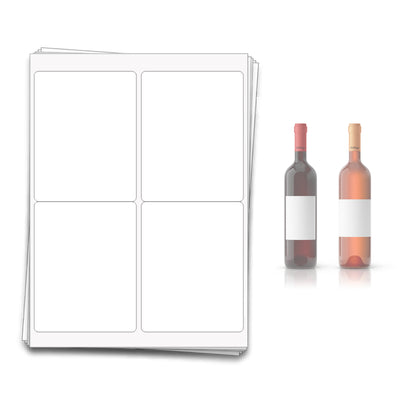
- a standard 750 ml wine bottle takes a 4 x 5 in. label, four to a sheet;
- use waterproof vinyl for any bottle that goes in the fridge or an ice bucket, and kraft or recycled paper for bottles that stay dry;
- the free wine label template (#8380) opens in Canva, Word and PDF, so you can design and print at home in about half an hour.
Below: sizes, materials, design tips, printing, applying, and ideas for weddings and gifts.
Printable wine labels turn a bottle of homemade merlot, or a case of good-value wine for a wedding, into something that looks made for the occasion. You design one label, print a sheet at home, and every bottle on the table carries your names, the date or your own winery name. Here's the size that fits, the free wine label template, which material to choose, and how to print and apply labels that survive an ice bucket.
Wine label size
Most 750 ml wine bottles, whether Bordeaux, Burgundy or sparkling, have about 5 in. of flat glass below the shoulder. A 4 x 5 in. label fits that space with room to spare.
| Bottle or spot | Label | Template |
|---|---|---|
| 750 ml wine bottle, front | 4 x 5 in. | #8380 |
| 750 ml wine bottle, back label | 3 x 3 in. square | #8429 |
| 50 ml mini bottles for favors | 3 x 1.5 in. | #8386 |
| Bottle neck tag | 3 x 1.25 in. hang tag | HT1205 |
Bottles with a strong taper or an unusual shape vary, so measure the flat area of yours before you print a full batch.
Our go-to is the 4 x 5 in. wine bottle label in waterproof white vinyl. It fits a standard 750 ml bottle, the ink stays put through condensation and an ice bucket, and it comes four to a sheet, 40 labels a pack (with a multi-pack discount in the cart when you buy several) or in a 200-label bulk box, with free template #8380.
Which material for wine labels
- Waterproof white vinyl (inkjet): for any bottle that will be chilled, iced or handled with damp hands. Bright color, wipes clean.
- Clear gloss (inkjet): a printed-on-glass look. Best on white or rosé bottles with dark type; light colors disappear on dark glass.
- Brown kraft (inkjet or laser): a rustic look for homemade fruit wines, meads and harvest gifts.
- Recycled white paper (inkjet or laser): a soft matte look for gift bottles and table displays that stay dry.
The free wine label template
Every pack uses template #8380, sized to the sheet so you never have to set up margins. Open it in Canva for the most design freedom, or in Word, Pages or PDF if you just need text. New to Canva? Start with designing your labels in Canva.
Want a finished design to start from? The free label design directory has wine label designs for weddings, birthdays and holidays that you can edit and print on the 4 x 5 in. labels.
Design tips that make a homemade label look professional
- Say less. A name, a year or occasion, and one short line. White space looks expensive.
- Two fonts at most: one for the name and one for everything else.
- Use high-resolution images, 300 dpi or more, or simple line art that stays sharp at any size.
- Keep text 1/8 in. from the edges, and let background colors run past the edge of the label in the template so there's no white sliver.
- Download as a PDF for print, which keeps fonts and colors exactly as designed.
What to put on a wine label
- Homemade wine: the wine's name, the grape or fruit, the vintage or bottling date, and your "winery" name. Add the alcohol percentage if you measured it.
- Weddings: the couple's names, the date and a short thank-you or a line from the toast.
- Birthdays and anniversaries: the name and the number, or the year they were born as the "vintage."
- Gifts: the occasion and a short message on the back label.
This guide covers homemade wine, gifts and events. Wine sold to the public is regulated, and commercial labels in the US need federal approval, so check with the TTB before labeling wine for sale.
How to print wine labels at home
- Design one label, then copy it to the other three spots on the sheet. For a set of names or table numbers, change only the text on each copy.
- Test on plain paper at 100% scale, not "fit to page," and hold the test over a label sheet against a window. If it's off, see how to print labels that line up.
- Match the printer to the material. Vinyl and clear are inkjet only; kraft and recycled paper work in inkjet or laser printers.
- Set the paper type to "Labels" or "Glossy" for vinyl and clear, so the printer lays down the ink more slowly.
- Let it dry 10 to 15 minutes before peeling, longer for dark, full-color designs.
How to apply labels to wine bottles
- Remove the old label if there is one. Soak the bottle in warm water with a spoonful of baking soda for 20 to 30 minutes, peel, and wipe off any glue with a little oil, then wash.
- Label at room temperature, before chilling. Labels don't stick to a cold, sweating bottle.
- Clean the glass with rubbing alcohol and let it dry.
- Mark a level line. A strip of painter's tape around the bottle gives you a straight guide for the bottom edge.
- Press from the center out to push out air. More tips in how to apply labels without bubbles.
Printable wine label ideas
- Wedding table wine: one bottle per table with the table number and the couple's names, so it doubles as a centerpiece.
- Bridesmaid proposals: "Will you be my bridesmaid?" on a bottle of rosé.
- Milestone birthdays: "Aged to perfection, est. 1976" on a bottle from their birth year, or one they love.
- Holiday and hostess gifts: one design for the season, with each recipient's name.
- Wedding favors: 50 ml mini bottles with the 3 x 1.5 in. mini bottle labels in the same design as the table wine.
For more bottle sizes, see all bottle labels, and for favors, our tropical party ideas.
The recommendation, once more: a standard 750 ml bottle takes the 4 x 5 in. wine bottle label. Choose waterproof vinyl for anything that will be chilled, design it with free template #8380, and print a test on plain paper first.